
Intermediaries
Required Fields
Intermediaries must report all fields required for Direct Service Providers, plus the following additional fields.
Shared with Direct Service Providers
| SAT Field | Description | Where to find it in Brinta |
|---|---|---|
| Type of service or operation | Category of the digital service | items[].category[] — see Items > Categories |
| Customer RFC (when requesting CFDI) | Buyer's tax ID | buyer.tax_registrations[].number where type IN (RFC, RFC personas físicas) — see Counterpart > Tax Reg. No. |
| Service price excluding VAT | Net transaction amount | items[].amount — see Items > Amount |
| VAT | Value Added Tax | items[].taxes[].amount where taxes[].name IN ("VAT","IVA") and taxes[].type = "VAT" — see Taxes Breakdown > Amount |
| Final price including VAT | Total amount including taxes | items[].final_amount — see Items > Total and General Information > Final Amount |
| CFDI Number | Electronic invoice identifier | invoice_number, invoice_serie, invoice_key (UUID). Only mandatory when an invoice is issued. |
| Recipient's payment method | How the customer paid | payment_method.type — see General Information > Type |
Additional Fields — Intermediaries Only
| SAT Field | Description | Where to find it in Brinta |
|---|---|---|
| Full name or legal entity name | Name of the seller/service provider on the platform | counterpart.legal_name or account_holder.legal_name — see Counterpart > Legal Name |
| Tax ID (RFC) or foreign tax identification number | RFC of the seller, or equivalent foreign tax ID | counterpart.tax_registrations[].number where type IN (RFC, RFC personas físicas, tax_id) — see Counterpart > Tax Reg. No. |
| CURP | Personal ID number for individuals | counterpart.tax_registrations[].number where type = "CURP" — see Counterpart > Tax Reg. No. |
| Tax domicile / place of residence / nationality | Address or country of residence of the seller | counterpart.address.country, counterpart.address.state, counterpart.address.address_line1, counterpart.address.address_line2 — also via account_holder.address.country, account_holder.address.state, account_holder.address.address_line1, account_holder.address.address_line2 — see Counterpart > Address |
| CLABE account number or foreign bank account | Bank account where funds are settled to the seller | payment_method.bank_account.account_number where payment_method.type = "bank transfer" |
| Income Tax Base (ISR) | Taxable base for ISR withholding | items[].taxes[].taxable_amount where taxes[].type = "ISR" — see Taxes Breakdown > Taxable Amount |
| VAT Base | Taxable base for VAT withholding | items[].taxes[].taxable_amount where taxes[].type = "VAT" — see Taxes Breakdown > Taxable Amount |
| IEPS Base | Taxable base for IEPS withholding | items[].taxes[].taxable_amount where taxes[].type = "IEPS" — see Taxes Breakdown > Taxable Amount |
| ISR Withholding | Amount withheld for Income Tax | items[].taxes[].amount where taxes[].type = "ISR" — see Taxes Breakdown > Amount |
| VAT Withholding | Amount withheld for VAT | items[].taxes[].amount where taxes[].type = "VAT" — see Taxes Breakdown > Amount |
| IEPS Withholding | Amount withheld for IEPS | items[].taxes[].amount where taxes[].type = "IEPS" — see Taxes Breakdown > Amount |
| Link invoice with transaction | Associates the CFDI with the original transaction | transaction_id (for payments) or refund_id (for refunds) — see General Information > ID |
Dashboard Reference
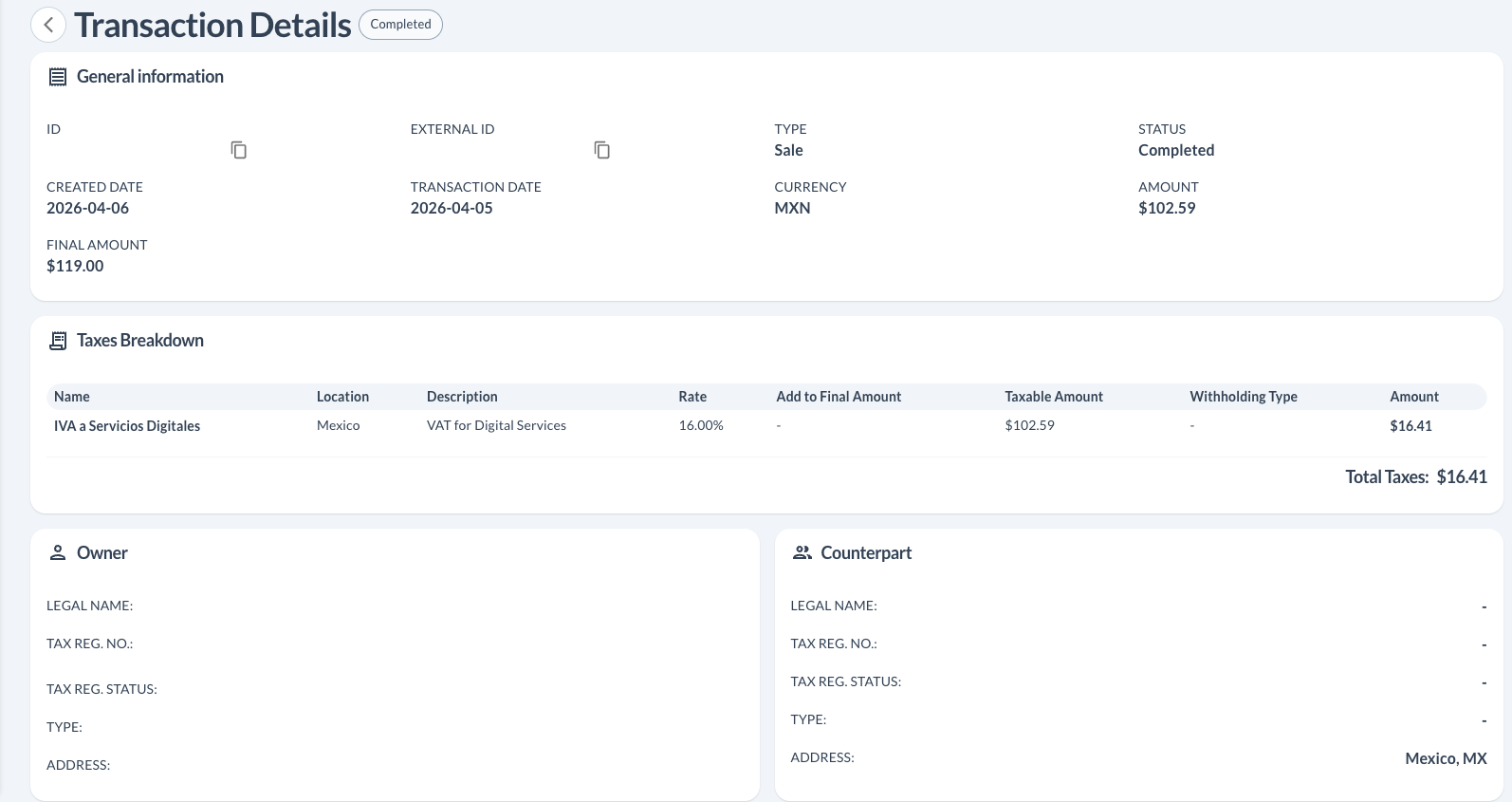
Transaction Details — General Information, Taxes Breakdown & Counterpart
The main transaction screen contains General Information (IDs, amounts, currency), Taxes Breakdown (tax name, taxable amount, withholding type, and amount), and the Counterpart panel (legal name, tax registration number, and address of the seller).
Transaction Details — Items
The Items section shows each line item with its service category code, net amount, and total (final amount including taxes).

Notes
- Counterpart in the dashboard corresponds to the seller or service provider operating through the platform.
- Withholding fields (ISR, VAT, IEPS) are only required when the intermediary is responsible for retaining taxes on behalf of the seller. When no withholding applies, the Withholding Type column will show
-. - CURP is only applicable for natural persons (individuals), not legal entities.
- VAT and final amount are calculated automatically by Brinta and do not need to be sent in the request.
Updated 5 months ago
Did this page help you?